Sea
Open water gets all wave sizes.
mods / shorewaves
Waves roll in from the sea, break into foam and wash up the beach - bigger in storms.
Shore Waves makes the coasts of Hytale come alive. Waves roll in from the open sea, curl, break with a splash and wash up onto the sand, where the foam slowly fades. Calm days bring small waves, rain and storms bring big ones.
Some nights a storm rolls in: heavy rain, a dark sky, lightning over the sea and thunder after it. The mod is server-side only, so players do not need to install anything. Inspired by the Minecraft Waves mod.
/waves admin/shorewavesfxshorewaves.adminsettings.json in the mod's data folder
mods folder and start the server. Nothing is needed on the players' side./waves test - eight waves roll towards you from every side and break about 2 blocks away./waves admin to change the style, the wave amount and the storm settings in game./shorewavesfx low or turn them off with /shorewavesfx off.The mod looks for shore spots around each player: the top water block with land next to it and open water behind it. Each wave rolls towards the shore, breaks, and its wash runs up a flat beach. All players within 48 blocks of a wave see the same wave at the same time, with the same splash and sound.
Open water gets all wave sizes.
Water that ends within 64 blocks counts as a lake and gets only small waves.
Water narrower than 24 blocks or shallower than 3 stays calm - no waves at all.
| Weather | Waves per second (per player) | Sizes |
|---|---|---|
| Calm | 2.4 | Mostly small: 65 % small, 30 % medium, 5 % large |
| Rain, snow, wind | 3.4 | One size step bigger |
| Storm, thunder, blizzard | 6.2 | Two size steps bigger |
Once per in-game day the world rolls whether a storm comes and when. The roll comes from the world seed, so every player of a world gets the same storm, and a restart does not change it. By default a storm has a 15 % chance per day, starts at night (between 19:00 and 04:00) and lasts 2.5 in-game hours.
A storm is the weather of the whole world. Every player under the open sky gets it, by the water or inland. When it ends, the normal weather comes back.
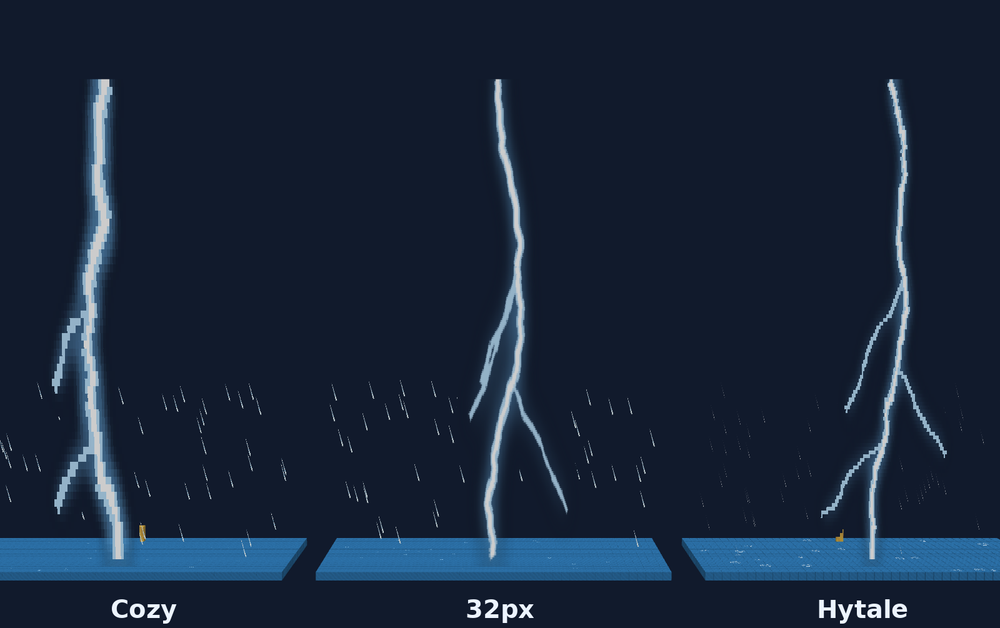
Waves, splashes and storm effects come in three looks. All three are always loaded, so a switch applies to the next waves. Admins switch it on the Overview tab of /waves admin, and the new style plays right in front of them.

Waves are particles sent by the server. Nothing in the world is changed and nothing is stored. Shore spots are cached, and a crowd on one beach does not multiply the waves: the wave rate is shared by the players standing together.
/shorewavesfx (alias /swfx) sets each player's own level: Full, Low (about a third of the waves, half the distance; in a storm only the weather's rain) or Off. Saved on the server, kept after restarts.Every setting is in settings.json and on the Settings tab of /waves admin. Values are clamped to safe ranges; /waves reload reads the file again.
| Setting | Default | What it does |
|---|---|---|
enabled | true | Waves on or off. |
style | 0 | 0 = Cozy, 1 = 32px, 2 = Hytale. |
radius | 26 | Shores are looked for this far around each player (blocks). |
wavesPerSecondCalm / Rain / Storm | 2.4 / 3.4 / 6.2 | Waves started per player per second. |
weightSmall / Medium / Large | 65 / 30 / 5 | Share of wave sizes in calm weather. |
waveScale | 1.0 | Size of all waves. |
pondProtection | true | No waves on ponds and puddles. |
lakeWaves | true | Small waves on lakes (false = none). |
viewDistance | 48 | Players this close see a wave (blocks). |
sounds | true | Breaking sounds from the game's own wave recordings. |
storms | true | Storms on or off. |
stormChance | 0.15 | Chance that a day gets a storm. |
stormHours | 2.5 | How long a storm lasts (in-game hours). |
stormsAtNight | true | Storms start only at night (off = any hour). |
stormInland | true | The storm reaches inland too (off = only by the sea). |
stormFog | 1 | 0 = barely any fog, 1 = light, 2 = heavy. |
lightningPerMinute | 5.0 | Strikes per minute during a storm. |
stormThunder | true | Thunder after each strike. |
lagGuard | true | Fewer waves while the world is lagging. |
worlds | default | Worlds the effects run in. default is the main world; an empty list means every world. |
updateCheck | true | Look for a new version on CurseForge after the server starts. |
| Command | What it does | Permission |
|---|---|---|
| Admin panel: switches, test waves, storm tools and every setting | shorewaves.admin | |
| Whether waves run in this world and how many have rolled so far | shorewaves.admin | |
| Turn the waves on or off in this world (until restart) | shorewaves.admin | |
| Eight waves roll towards you from every side | shorewaves.admin | |
| Force a storm here for 5 minutes | shorewaves.admin | |
| Stop a forced storm | shorewaves.admin | |
| A lightning strike next to you | shorewaves.admin | |
| Reload settings.json | shorewaves.admin | |
| Your own wave and storm level; without an argument opens a small menu (alias /swfx) | every player |
No. Everything is sent by the server.
Pond protection keeps water narrower than 24 blocks or shallower than 3 calm. Lakes get only small waves.
Run /waves storm for a 5-minute storm in your world, or use the Storm button in /waves admin.
Yes. Turn storms off in the Settings tab or in settings.json.
By default the mod runs only in the main world. Tick more worlds on the Worlds tab of /waves admin.